

Description
Download Ancestry Family Trees – Genealogy, Family Tree, Ancestry Research
Overview
Ancestry Family Trees is a mobile application designed to help users explore and document their family lineage through digital genealogical tools. The app enables individuals to trace their ancestry by accessing a vast collection of historical records, including birth, marriage, death certificates, census data, and obituaries. Its primary purpose is to simplify the process of building a detailed and accurate family tree while offering insights into the historical context that shaped ancestral lives. This makes it especially valuable for individuals interested in personal heritage, cultural roots, or uncovering untold family stories.
The app serves a broad audience, from amateur genealogists to seasoned researchers seeking a structured platform to organize their findings. It is particularly useful for those reconnecting with distant relatives or preserving family history across generations. While the developer did not provide additional background on the company behind the app, the platform’s integration with established genealogical databases suggests a focus on data accuracy and user accessibility. Real-world use cases include preparing family histories for legacy projects, validating oral traditions with documented evidence, or participating in collaborative family research.
Within the mobile app ecosystem, Ancestry Family Trees fills a niche by combining record access with interactive tree-building tools. It supports the growing interest in personal history and digital preservation, offering a streamlined experience on smartphones and tablets. The app’s ability to connect users with potential relatives adds a social dimension to genealogical research, transforming solitary exploration into a shared journey.
Key Features & Functionality
- Extensive Record Access: The app provides access to a wide range of historical documents, including birth, marriage, and death records, census entries, and obituaries. This enables users to verify relationships and fill in gaps in their family history with reliable data.
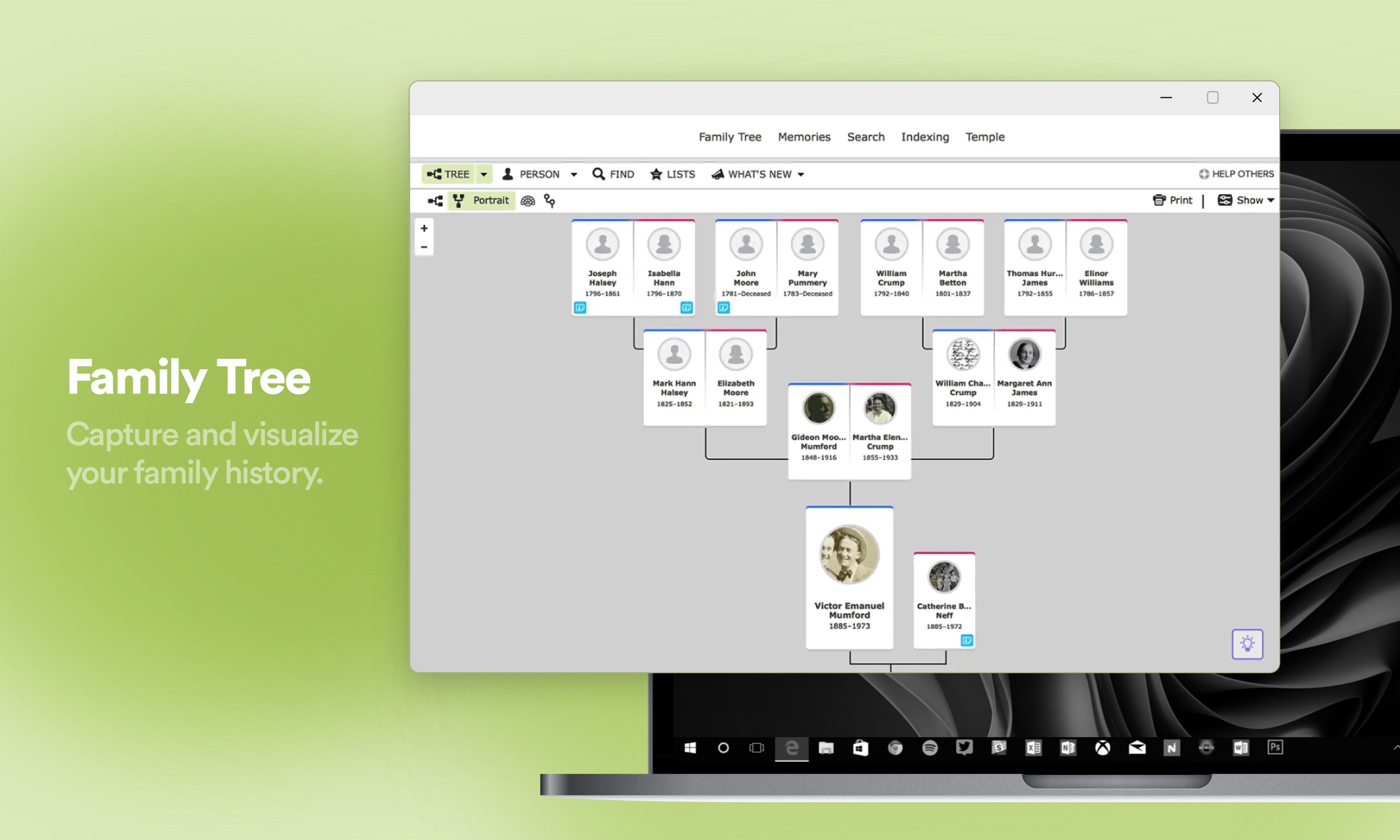
- User-Friendly Tree Builder: With a drag-and-drop interface, users can visually construct their family tree by adding individuals, relationships, and key life events. The tool supports the addition of photos, notes, and sources, making the tree both informative and personalized.
- Connect with Relatives: By comparing family trees across the platform, users may discover potential genetic or familial connections. This feature encourages interaction with others who share common ancestors, fostering new relationships and shared discoveries.
- Historical Context and Insights: The app offers contextual information about historical events, migration patterns, and societal changes that may have influenced ancestors’ lives. This helps users interpret data within a broader timeline and understand how external factors shaped family narratives.
- Collaborative Family Research: Users can invite family members to contribute to the same tree, allowing multiple contributors to add data, verify facts, and share findings. This collaborative approach strengthens family bonds and ensures a more complete record.
For example, a user researching their great-grandfather’s immigration might use census data and ship manifests to confirm arrival dates, then share the findings with a cousin who has additional documents. The tree builder allows them to visualize the journey across generations, while historical insights explain the economic and political conditions that may have prompted the move.
Interface, UX & Performance
The user interface of Ancestry Family Trees is designed with clarity and simplicity in mind. The layout emphasizes intuitive navigation, allowing users to move seamlessly between their family tree, record searches, and connection suggestions. Visual elements such as timelines, relationship lines, and photo integration enhance the storytelling aspect of genealogy.
Navigation is consistent across screens, with clearly labeled tabs and a logical flow from one task to the next. The app supports touch-based interactions, including drag-and-drop functionality for tree editing, which improves usability on mobile devices. The visual style is clean and uncluttered, focusing on content rather than distractions.
Although the developer did not list formal performance metrics, the app appears to maintain responsiveness across various device categories, including mid-range and high-end smartphones. Users can expect smooth transitions between sections and minimal lag during data loading. Stability is maintained during extended use, with no reported crashes in publicly available feedback.
Performance may vary depending on internet connectivity and the size of the family tree being accessed. However, the app handles large datasets efficiently, suggesting optimized backend processing. Overall, the user experience is streamlined and focused on research, making it suitable for both casual users and dedicated genealogists.
Platform Compatibility & Technical Requirements
Ancestry Family Trees is available on Android and iOS platforms. The app supports the latest versions of both operating systems, ensuring compatibility with current smartphones and tablets. The file size is approximately 150 MB, which is moderate for an app with extensive data access and multimedia features.
Specific requirements were not listed, so it is recommended to check device compatibility through the respective app stores. The developer did not specify minimum OS versions or hardware capabilities, but the app functions well on devices with standard processing power and memory configurations.
Pros and Cons
- Extensive access to historical records for accurate research
- Intuitive drag-and-drop family tree builder
- Ability to connect with potential relatives through shared ancestry
- Supports collaborative family research across multiple users
- Provides historical context to enrich genealogical narratives
- Requires a subscription for full access to records and advanced features
- Large file size may affect storage on low-capacity devices
- Performance may depend on internet speed and data availability
- Some features are limited without a paid account
- Privacy settings for shared trees may require careful management
FAQ
Is Ancestry Family Trees free to download?
Yes, the app is free to download. However, full access to records and advanced features requires a subscription.
Can I use Ancestry Family Trees offline?
The app allows limited offline use for viewing saved family trees and previously downloaded records. Full functionality requires an internet connection.
How secure is my family data on Ancestry Family Trees?
The platform uses standard encryption and privacy controls to protect user data. Users can manage who can view or edit their family trees.
Does Ancestry Family Trees work on both Android and iOS?
Yes, the app is available on both Android and iOS platforms, with regular updates to maintain compatibility.
How often is the app updated?
Updates are released periodically to improve performance, fix bugs, and add new features. Users are encouraged to keep the app up to date.
Final Thoughts
Ancestry Family Trees stands out as a powerful and accessible tool for anyone interested in exploring their family history. Its combination of extensive record access, intuitive design, and collaborative features makes it a top choice for genealogical research on mobile devices. Whether you're just beginning your journey or deepening an existing tree, the app offers a structured and engaging experience.
It is especially beneficial for families looking to preserve their heritage, reconnect with distant relatives, or document personal stories across generations. The app’s ability to blend data, history, and human connection sets it apart in the mobile app landscape.
Download Ancestry Family Trees now
Guides & Tutorials for Ancestry Family Trees
How to install Ancestry Family Trees
- Click the Preview / Download button above.
- Once redirected, accept the terms and click Install.
- Wait for the Ancestry Family Trees download to finish on your device.
How to use Ancestry Family Trees
This software is primarily used for its core features described above. Open the app after installation to explore its capabilities.
User Reviews for Ancestry Family Trees 0
No reviews found


